


Sep 8, 2011 5:52 AM
Redesigning the componentpanel for a PrinterToner
-
Like (0)


Hello world!
I'm creating a PrinterMIB zenpack, based on Jane Curry's BridgeMIB document. This zenpack pretends to extend the one from Tonino Greco, giving information about the toners, and modeling them as hw components.
The model is already implemented (big thanks to bigegor's advices) and the printers get correctly modeled. Now i'm stuck at the UI. Every attribute i try to show into the details panel, i get to show it, but there's no luck with the componentPanel for my PrinterToner component... There's something wrong (i guess) in my PrinterMIB.js, and I don't get to see what is the problem...
I've been able to modify componentPanel from other zenpacks and also from ipinterface from ZenModel (which i would like not to loose on the next upgrade, but that's another discussion i'll post later), and I don't understand the problem :S.
Someone could give me a hint? Here is the pastebin with PrinterMIB.js, info.py, interfaces.py, and configure.zcml, i also attach a tgz with all the files conforming the present state of my "newbie battle versus zenoss" also called "why didn't I code for so many years? :S"
Thanks!
 TonerScreen.jpg
(105.2 K)
TonerScreen.jpg
(105.2 K)
Which full name of you zenpack? Chek this
The browser:resourceDirectory stanza indicates where to find JavaScript files.
● The name (namespace) field must match the last part of the ZenPack name – bridge
● The directory field is the subdirectory from the base directory of the ZenPack resources
Second use error console (i use in Opera), any problem with java will be see.
Also can you make print screen ? and post here or make egg file.
Hi, Andrey,
the namespace on configure.zcml was not respecting case-sensitive, now that's fixed. The console of chromium and firefox gives no hints about what's happening. I read if you don't use some fields at the js, the whole thing doesn't have effect, showing the default visualization, but i'm pretty sure there's all the required fields defined...
I uploaded the egg and a print screen of the componentPanel and Details tab.
ERROR zen.ModelerService: ('Traceback (most recent call last):', ' File "/usr/local/zenoss/Products/DataCollector/Plugins.py", line 102, in create', ' self.modPath)', ' File "/usr/local/zenoss/Products/DataCollector/Plugins.py", line 173, in importPlugin', ' return importClass(modPath)', ' File "/usr/local/zenoss/Products/ZenUtils/Utils.py", line 369, in importClass', ' classname, modulePath))', 'ImportError: Failed while importing class PrinterTonerModeler from module ZenPacks.community.PrinterMIB.modeler.plugins.community.snmp.PrinterTonerModeler')
Traceback (most recent call last):
File "/usr/local/zenoss/Products/ZenHub/services/ModelerService.py", line 41, in createDeviceProxy
plugin = loader.create()
File "/usr/local/zenoss/Products/DataCollector/Plugins.py", line 111, in create
traceback=traceback.format_exc().splitlines())
PluginImportError: ('Traceback (most recent call last):', ' File "/usr/local/zenoss/Products/DataCollector/Plugins.py", line 102, in create', ' self.modPath)', ' File "/usr/local/zenoss/Products/DataCollector/Plugins.py", line 173, in importPlugin', ' return importClass(modPath)', ' File "/usr/local/zenoss/Products/ZenUtils/Utils.py", line 369, in importClass', ' classname, modulePath))', 'ImportError: Failed while importing class PrinterTonerModeler from module ZenPacks.community.PrinterMIB.modeler.plugins.community.snmp.PrinterTonerModeler')
Why you use 'community' for name of yours zenpack. By documentation second name should be name of organisation or yours name. For more details see 3.2.1. ZenPack Names
Put modeler file in folder 'modeler/plugins'
Uploaded again :S
Sorry about that, i had the build folder with some old files... PrinterTonerModeler doesn't exist since a week ago :S
I did use community in order to giving it out to community in case this ZenPack gets finished. I got confused, though I could do it.
The modeler i'm using is PrinterTonerMap.py and is currently working on modeler/plugins/snmp/community.
Thanks a lot for your fastness!!!
Now it works! 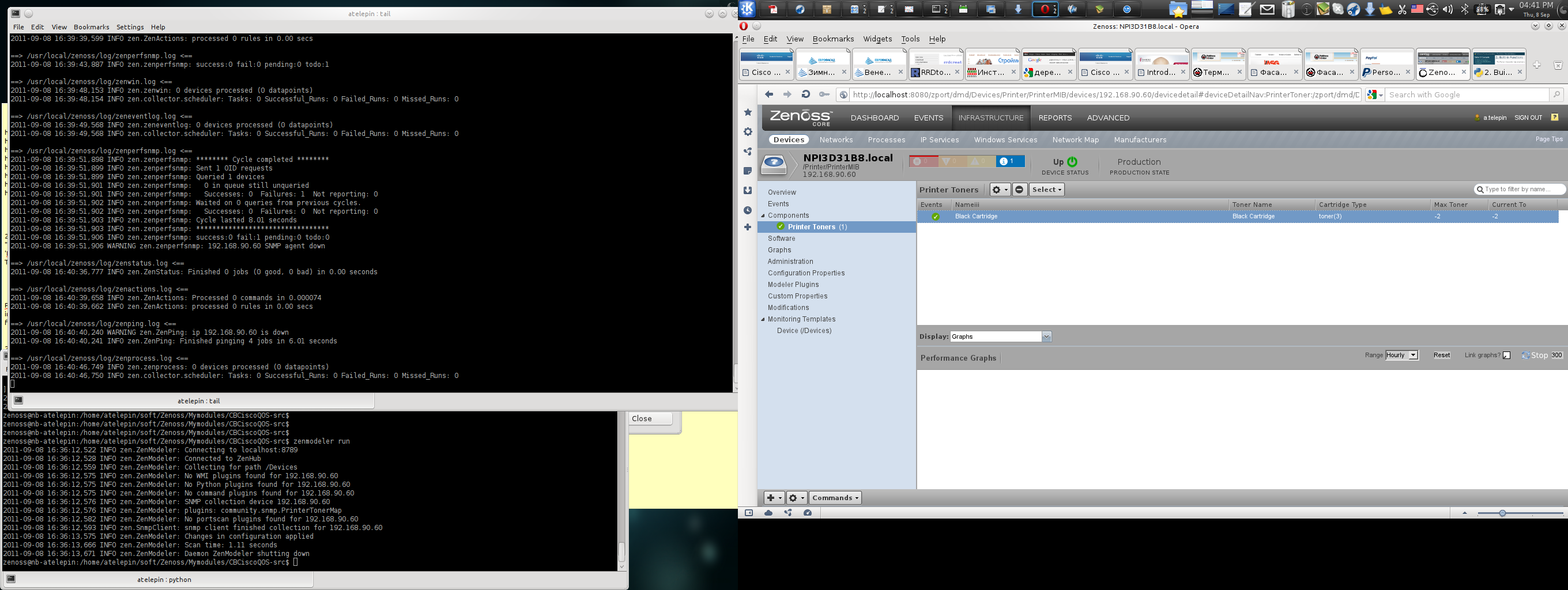
class PrinterToner(DeviceComponent, ManagedEntity):
portal_type = meta_type = 'PrinterToner'
ZC.PrinterTonerPanel = Ext.extend(ZC.ComponentGridPanel, {
constructor: function(config) {
config = Ext.applyIf(config||{}, {
componentType: 'PrinterToner',
Awesome!!!! Thanks a lot, Andrey!!!
Now let's RRD it 
If you will need help with rrd in component panel feel free to write me, i have experience with that.
I'm currently with other work, and i'm doing this at home, so tonight (i'm at GMT+1) I will study this part and try to implement.
I appreciate your help!
|
Follow Us On Twitter »
|
Latest from the Zenoss Blog » |

|
Community | Products | Services Resources | Customers Partners | About Us | |
|
|

|

Copyright © 2005-2011 Zenoss, Inc.
|
||||||
